How to Use Nano Banana for Professional Image Editing with Text Prompts
A case-study guide to Nano Banana prompt writing, with real examples from official and community-shared edits across portraits, products, scene changes, and stylized transformations.
How to Use Nano Banana for Professional Image Editing with Text Prompts
If you want Nano Banana to feel useful, you need examples, not abstract advice.
The examples below come from real public cases. Some come from Google's official Nano Banana examples page, and some come from community galleries that share example prompts and outputs. The point is not to admire the images. The point is to see what kinds of edits Nano Banana handles well, and what that teaches you about writing better prompts.
What These Cases Show
Across the examples below, the same pattern keeps showing up:
- Nano Banana is strong when the subject is clear
- it does better when the transformation is specific
- it gets more reliable when important details are protected
- it works especially well for "change one layer, preserve the rest" edits
That is the mindset to bring into your own prompts.
Case 1: Turn a Pet into a 16-bit Game Character
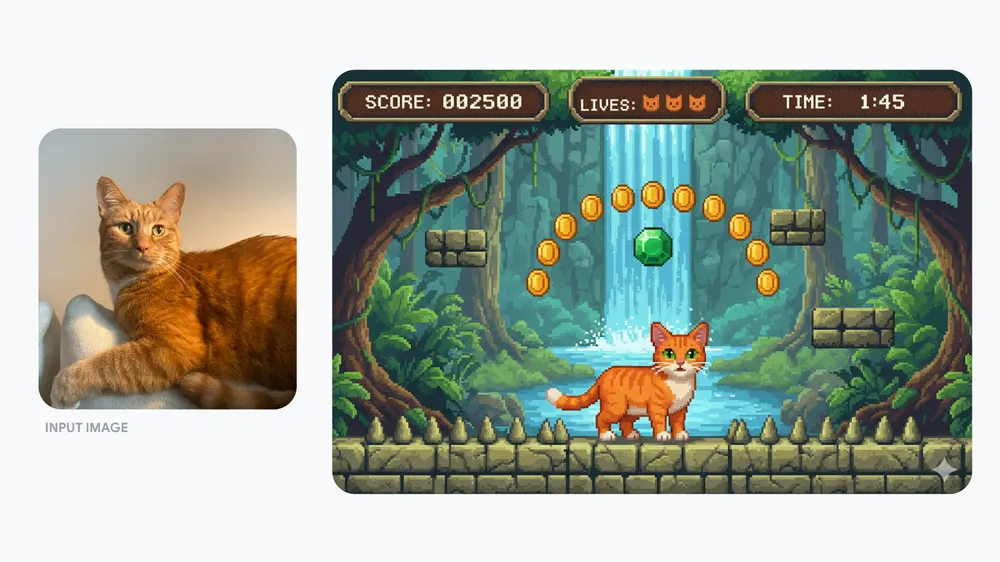
Source: Google official example
Prompt idea:
Recreate this cat as a 16-bit video game character, and place the character in a level of a 2D 16-bit platform video game.
Why this works:
- the subject is singular and obvious
- the style target is extremely specific
- the scene change is large, but still tightly defined
Takeaway:
If you want a stylized result, name the exact visual language. "Retro game", "pixel art", "editorial product photo", and "pencil sketch" are much better than "make it cool."
Case 2: Put an Adult in a Scene with Their Younger Self
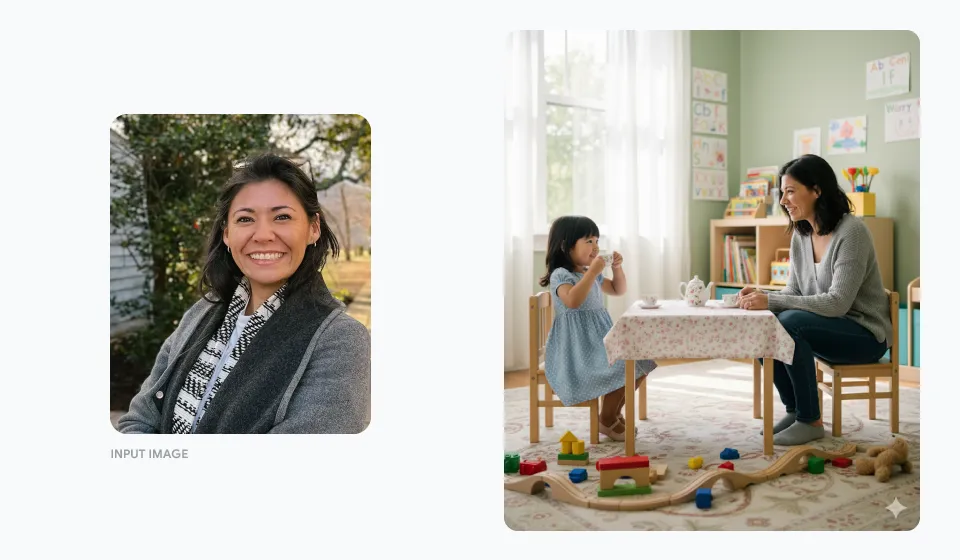
Source: Google official example
Prompt idea:
Create a photo of me as an adult sitting with myself as a child in a playroom having a tea party together.
Why this works:
- the relationship between subjects is explicit
- the environment is clear
- the edit is imaginative, but still compositionally simple
Takeaway:
When your prompt involves multiple characters or versions of the same person, spell out the relationship between them. Do not leave the scene logic for the model to invent.
Case 3: Convert Ingredients into a Plated Dessert
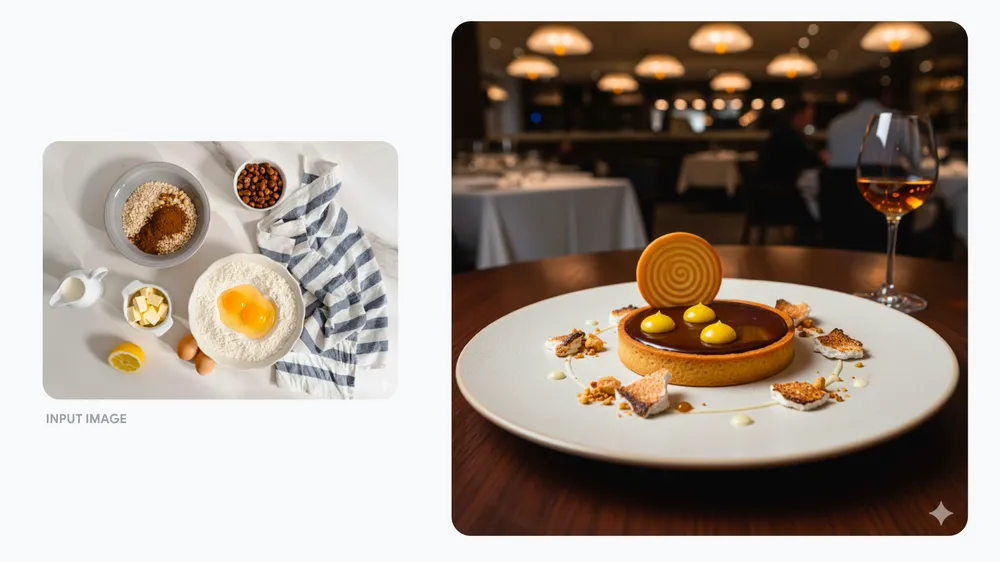
Source: Google official example
Prompt idea:
Turn these ingredients into a refined delicious-looking dessert, inspired by these ingredients. Plate it as if it were a dish at a 5-star avant-garde restaurant.
Why this works:
- the input ingredients constrain the idea
- the plating target is specific
- "5-star avant-garde restaurant" gives a strong aesthetic direction
Takeaway:
For food, product, and brand-image prompts, do not just describe the object. Describe the presentation standard too.
Case 4: Turn a Dog into a Collectible Desk Figurine
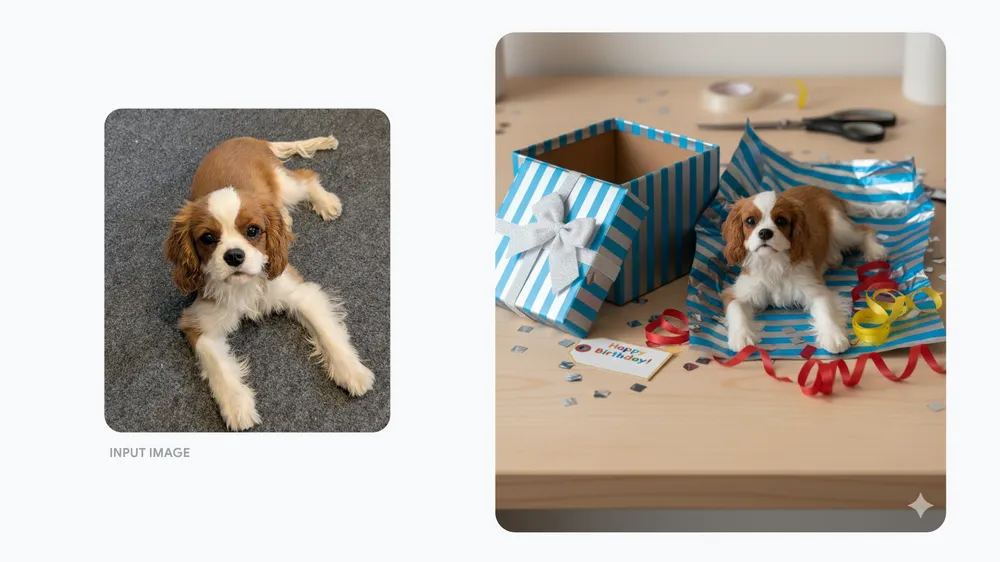
Source: Google official example
Prompt idea:
Create a realistic-looking small 3D model of this dog. Place the model on a desk next to birthday packaging that makes it look like someone unwrapped the model as a gift.
Why this works:
- the transformation target is concrete: collectible figure
- the supporting props make the output read instantly
- the desk setting anchors scale
Takeaway:
If you want a transformation to feel believable, add one or two context props that explain the scene. Props often do more work than extra adjectives.
Case 5: Change a Dress Material Without Changing the Person
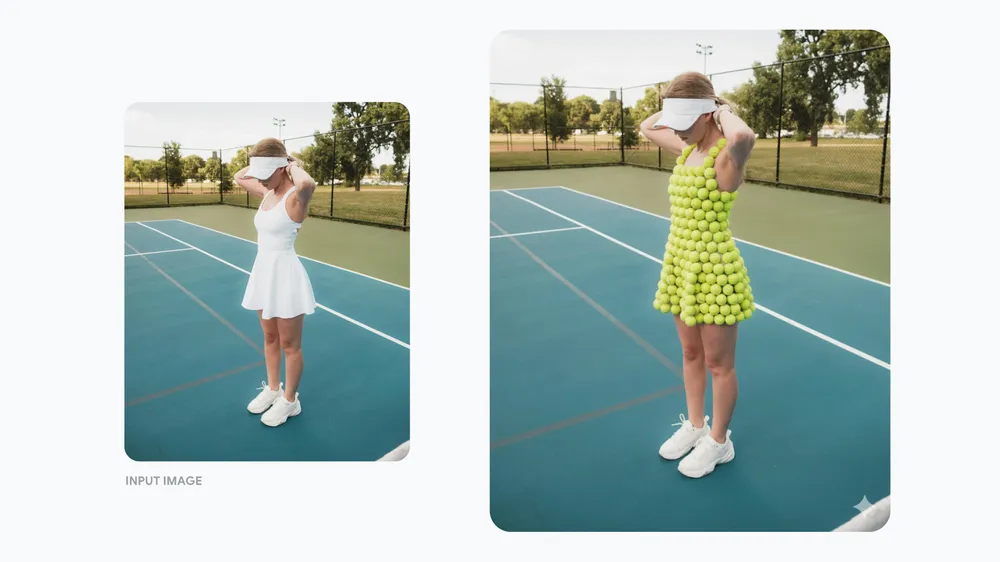
Source: Google official example
Prompt idea:
Change this person's dress to be made out of tennis balls.
Why this works:
- only one element is being transformed
- the pose, person, and setting are preserved
- the humor comes from material replacement, not full-scene chaos
Takeaway:
Nano Banana is often strongest when you edit one clear layer of the image and keep the rest stable. This is a useful pattern for fashion, packaging, thumbnails, and ad concepts.
Case 6: Redesign a House into a Tropical Version
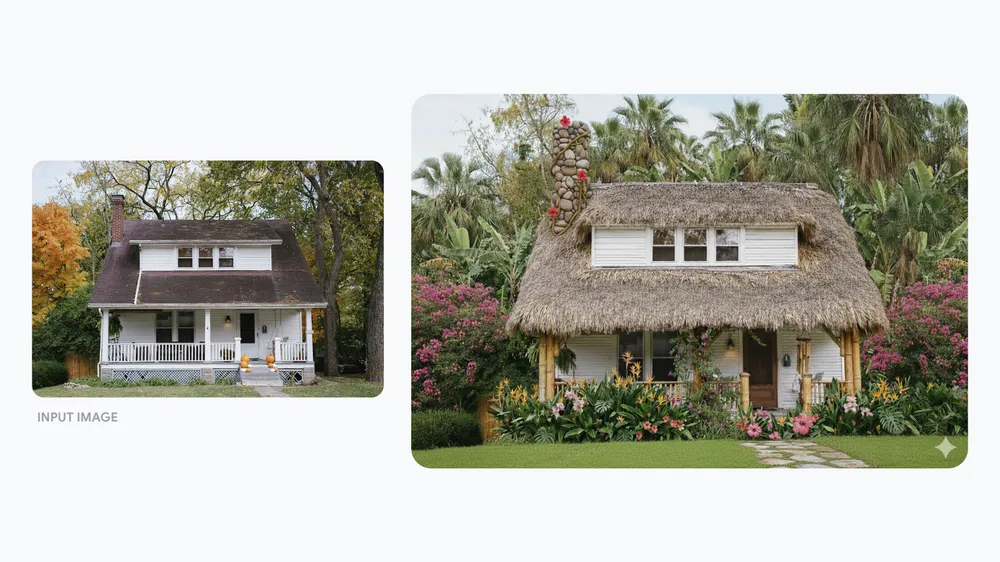
Source: Google official example
Prompt idea:
Transform this house into a vibrant tropical island design. Replace the roof with thatch and add bamboo structural elements. Surround it with lush, colorful tropical plants and palm trees.
Why this works:
- the architecture edits are itemized
- the environment upgrade is not generic
- the transformation respects the original structure enough to stay legible
Takeaway:
For scene redesigns, break the edit into parts. "Replace roof," "add bamboo," and "surround with tropical plants" is much better than saying "make it tropical."
Case 7: Turn a Simple Product Shot into a Creative Ad
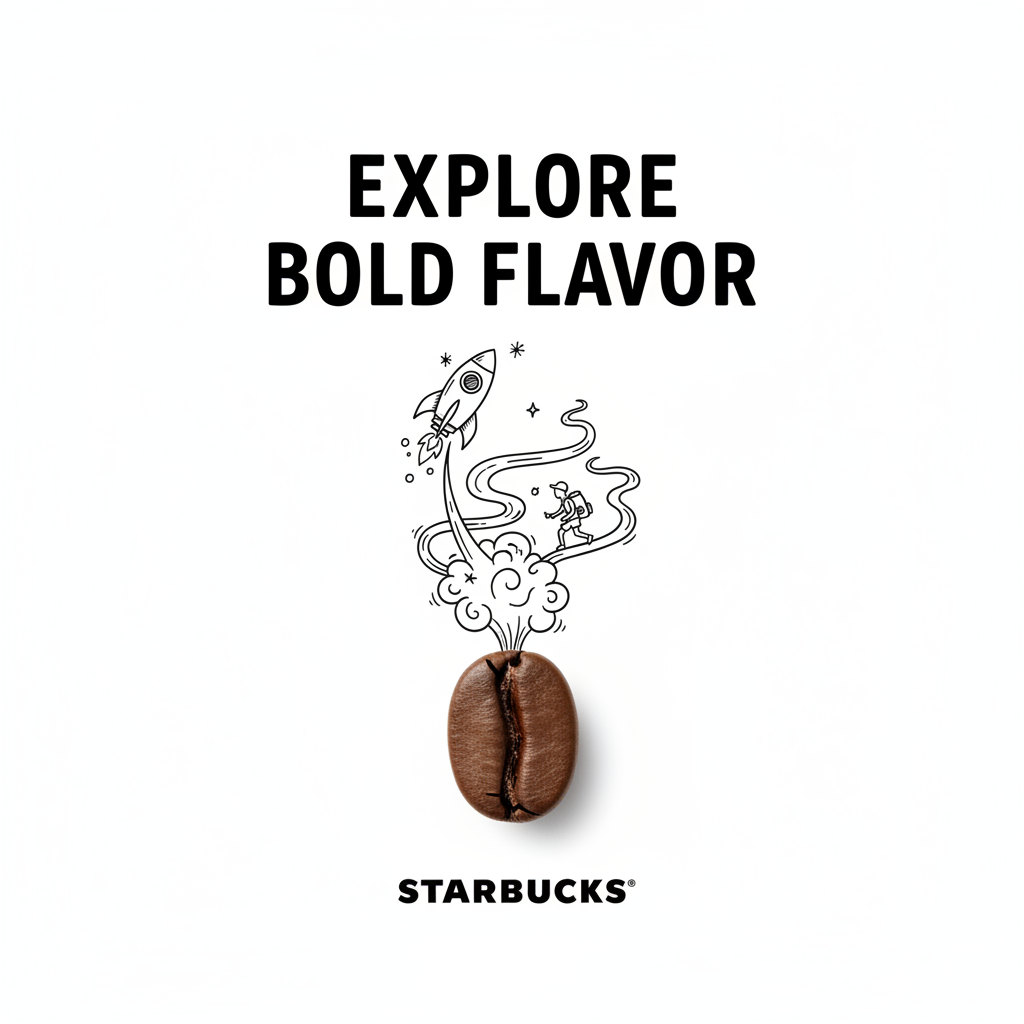
Source: Community example gallery
Prompt idea:
A minimalist and creative ad on a pure white background. A real object combined with hand-drawn black ink doodles, creating a playful and artistic composition.
Why this works:
- the background is tightly controlled
- the mixed-media effect is specific
- the ad direction is stronger than a generic "make it more creative"
Takeaway:
For marketing images, define the art direction like a designer would: background, medium, composition style, and mood.
Case 8: Generate a Product Exploded View
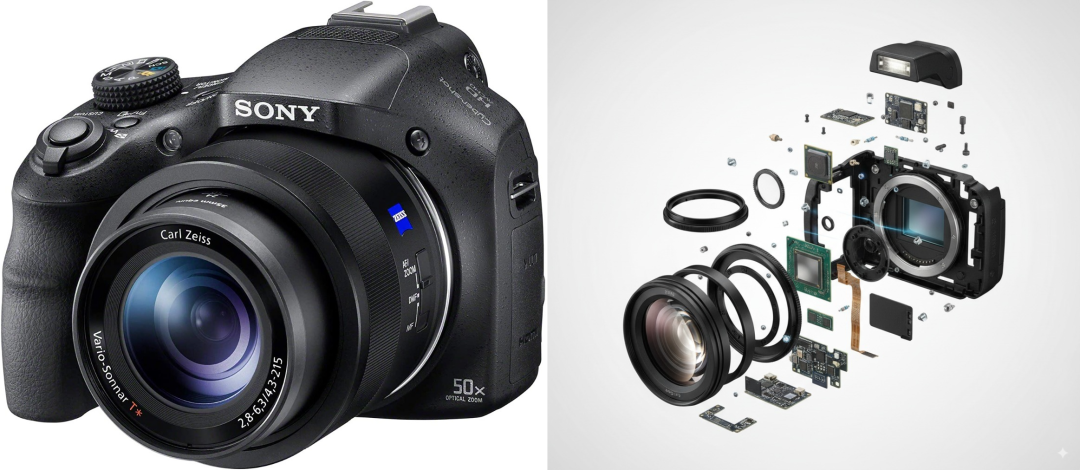
Source: Community example gallery
Prompt idea:
Ultra-detailed exploded view of a product, metallic parts and electronic components floating in mid-air, perfectly aligned, revealing inner structure, futuristic technology aesthetic.
Why this works:
- the view type is explicit
- the parts behavior is explicit
- the aesthetic target is clear without being overstuffed
Takeaway:
If you want diagram-like or technical imagery, name the camera logic or view type directly: exploded view, cutaway, top-down layout, product sheet, blueprint, and so on.
What These Examples Teach About Prompt Writing
Across all 8 cases, the strongest prompts do at least 3 things:
- identify the subject clearly
- define the exact transformation
- specify the target presentation style
The weak prompt style is:
make this look better
The stronger prompt style is:
Keep the product shape unchanged. Replace the background with a clean white studio setup, add soft realistic shadow, and make it look like a premium e-commerce product photo. Do not alter the label or brand colors.
That is the gap between guessing and directing.
A Better Prompt Formula
If you want something reusable, use this:
Keep [what must stay the same]. Change [what should change]. Make it look [style target]. Do not change [protected details].
Examples:
Keep the person's identity unchanged. Change the background to a clean editorial studio setup. Make it look like a premium beauty campaign. Do not change the hairstyle, expression, or facial proportions.
Keep the packaging shape and branding unchanged. Change the background to pure white, add soft shadow, and make it look like a clean retail product photo. Do not alter the logo, text, or product color.
The 4 Biggest Prompt Mistakes
1. Too vague
Bad:
make it more professional
2. Too many conflicting goals
Bad:
make it realistic, cinematic, minimal, dramatic, colorful, dark, premium
3. No protected details
If the image contains a face, logo, label, or text, say what must not change.
4. Trying to do everything in one pass
A cleaner workflow is:
- structure edit
- polish pass
- fix pass
That is usually more stable than one monster prompt.
Quick Checklist
- Say what should stay the same
- Say what should change
- Name the target style clearly
- Protect important details like text, logos, or identity
- Use examples to borrow structure, not to copy blindly
- For harder edits, work in 2 to 3 passes