How to Run OpenClaw with Local Models
A practical OpenClaw setup guide for Ollama and local models: what to install, how onboarding works, how model discovery works, and where local-only setups break down.
How to Run OpenClaw with Local Models
Running OpenClaw with local models sounds simple: install Ollama, pull a model, save money.
That part is real. But the official docs add two important caveats:
- the easiest local path is Ollama plus
openclaw onboard - serious local-only agent use still needs strong models, large context, and tighter prompt-injection discipline than most people expect
So this guide keeps both truths in view. It shows the fastest working setup, and it shows where local OpenClaw is still a tradeoff.
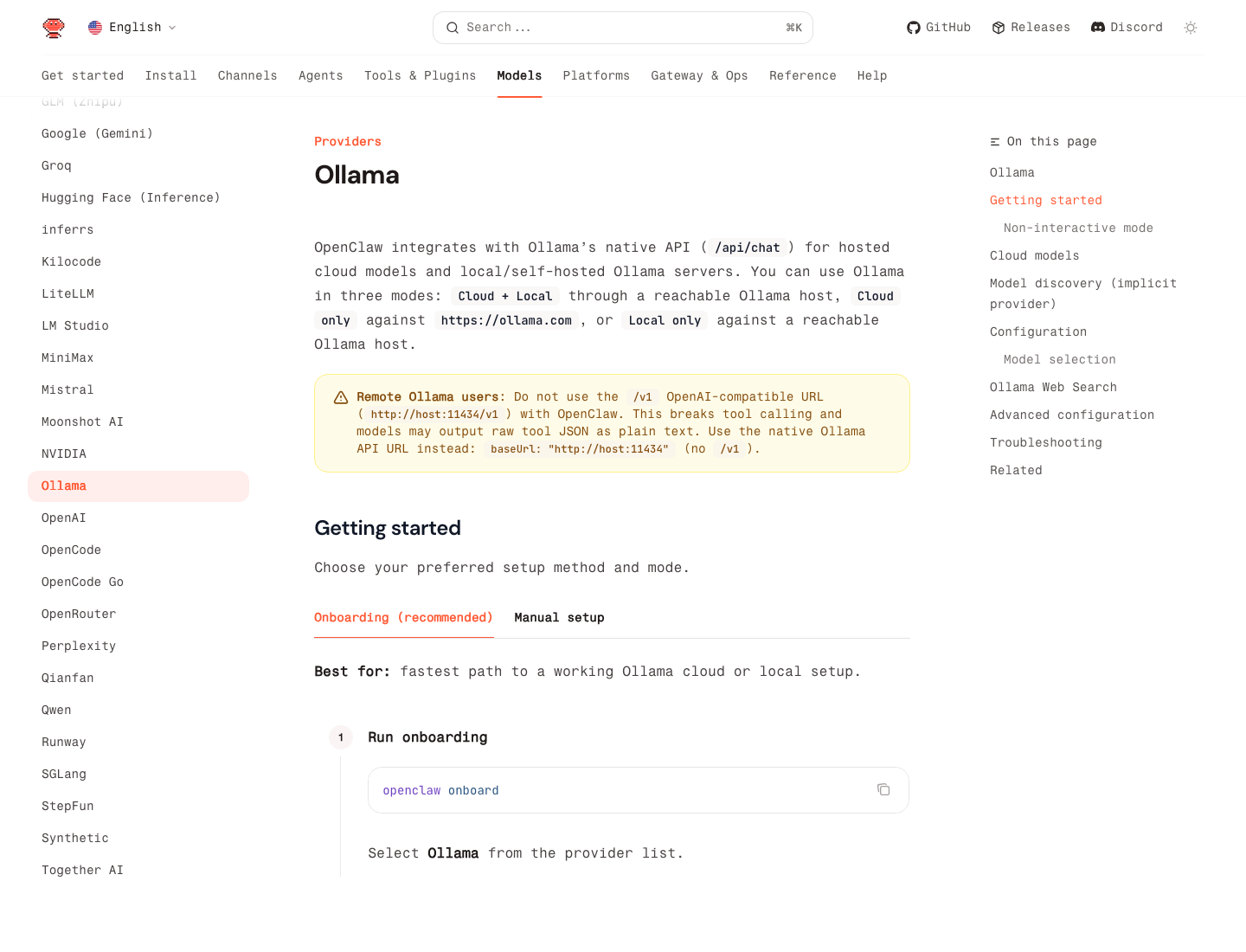
Source: Ollama provider docs
The Short Version
If you want the lowest-friction local setup, the official OpenClaw docs recommend:
- install Ollama
- run
openclaw onboard - choose
Ollama - pick
Local only - pull or auto-pull a model
- set it as your default
That gets you a working setup fast. For most people, that is the right place to start.
What Local Models Are Good For
Local OpenClaw is a strong fit when you care about:
- lower recurring model cost
- local privacy for sensitive text
- offline or mostly-offline experimentation
- predictable development and testing
It is especially useful for:
- document Q&A
- summaries
- lower-risk automation
- development and workflow prototyping
It is much less ideal when you expect frontier-model quality on a weak box.
The Most Important Limitation
OpenClaw's own local-model guide is unusually blunt: local is possible, but agent workloads want large context and strong prompt-injection resistance. The docs explicitly warn that small or aggressively quantized models can truncate context and weaken safety.
That means:
- a cheap local model may be fine for summarization
- the same model may be a bad idea for tool-heavy or high-permission agents
If your OpenClaw agent touches email, browser actions, or other sensitive tools, local-only on a weak model is not automatically the safer choice.
The Fastest Working Setup: Ollama + Onboarding
OpenClaw integrates with Ollama's native API at /api/chat, not the OpenAI-compatible /v1 path.
That detail matters. The docs explicitly warn that using http://host:11434/v1 with OpenClaw can break tool calling and cause models to dump raw tool JSON into plain text. For Ollama, use the native base URL only:
http://127.0.0.1:11434
Step 1: Install Ollama
Install Ollama from ollama.com/download.
Then verify:
ollama --version
Step 2: Pull a local model
The current OpenClaw provider docs use examples like:
ollama pull gemma4
# or
ollama pull gpt-oss:20b
# or
ollama pull llama3.3
If you just want the lowest-friction first run, gemma4 is the current suggested local default in the docs.
Step 3: Run onboarding
openclaw onboard
Then:
- choose
Ollama - use the default base URL
http://127.0.0.1:11434 - choose
Local only - let OpenClaw discover models
- let it auto-pull the selected model if needed
Step 4: Check what OpenClaw sees
openclaw models list --provider ollama
Then choose your default:
openclaw models set ollama/gemma4
That is enough for a real local setup.
The 3 Ollama Modes OpenClaw Supports
The official provider docs describe three modes:
Local onlyCloud + LocalCloud only
For this article, Local only is the main focus. But the practical distinction matters:
Local onlyis the strongest privacy pathCloud + Localis the safest compromise for many real usersCloud onlyis just Ollama-hosted cloud access, not local inference
If you need stronger reasoning on hard tasks but still want local control for day-to-day runs, Cloud + Local is usually more realistic than forcing everything through one local model.
How Auto-Discovery Works
One of the nicest OpenClaw details is that you do not always need a giant manual model config.
According to the provider docs, if OLLAMA_API_KEY is set and you do not define an explicit models.providers.ollama block, OpenClaw auto-discovers local models from http://127.0.0.1:11434.
It does that by:
- querying
/api/tags - doing best-effort
/api/showlookups - reading context window info when available
- marking all Ollama model costs as
0
The minimal implicit setup is:
export OLLAMA_API_KEY="ollama-local"
Then:
ollama list
openclaw models list
This is the cleanest setup for a single-machine local install.
When You Need Explicit Config
Use explicit config when:
- Ollama runs on another host
- you need a custom base URL
- you want to define models manually
- you want tighter control over context windows or aliases
Example:
{
  "models": {
    "providers": {
      "ollama": {
        "baseUrl": "http://ollama-host:11434",
        "apiKey": "ollama-local",
        "api": "ollama",
        "models": [
          {
            "id": "gpt-oss:20b",
            "name": "GPT-OSS 20B",
            "reasoning": false,
            "input": ["text"],
            "cost": { "input": 0, "output": 0, "cacheRead": 0, "cacheWrite": 0 },
            "contextWindow": 8192,
            "maxTokens": 81920
          }
        ]
      }
    }
  }
}
Two rules matter here:
- keep
api: "ollama" - do not add
/v1to the base URL
Hardware Reality Check
If you only read the Ollama provider page, local setup looks easy. If you also read OpenClaw's local-model guide, the message gets sharper: serious local agent use wants much more hardware than most hobby setups provide.
The official local-model page says the high-end recommendation is closer to LM Studio plus a large local model on serious hardware, and it explicitly warns that small cards and heavily quantized checkpoints raise prompt-injection risk.
The practical takeaway is:
- local is great for low-risk tasks
- local is not automatically good enough for every agent workload
- if the model is too weak, use local for cheap tasks and keep a hosted fallback
The Best Practical Pattern: Local First, Hosted Safety Net
The OpenClaw local-model docs recommend a merged model setup when you need resilience:
- local as primary for cheap or private work
- hosted fallback for tougher turns
That is usually smarter than pretending one local model can do everything.
In plain English:
- summaries, drafts, and structured extraction: local is often fine
- long context, high-stakes tool use, complicated reasoning: keep a stronger fallback available
The 5 Most Common Mistakes
1. Using the Ollama /v1 endpoint
This is the biggest one. OpenClaw's Ollama docs explicitly say not to do it.
Wrong:
http://127.0.0.1:11434/v1
Right:
http://127.0.0.1:11434
2. Assuming "free" means "good enough"
Local model cost can be zero while quality is still too low for the workflow.
3. Using weak local models for high-permission agents
If the model has poor context retention or poor resistance to prompt injection, high-risk automation becomes harder to trust.
4. Over-configuring too early
If you are on one machine with Ollama local only, start with onboarding and implicit discovery before building manual config.
5. Expecting local-only to be the best fit for everything
For many users, the best production setup is hybrid, not pure local.
Quick Checklist
- Install Ollama
- Pull at least one local model
- Run
openclaw onboard - Choose
OllamaandLocal only - Use the native Ollama base URL, not
/v1 - Verify with
openclaw models list --provider ollama - Set the default model
- Keep hosted fallback models if your local box is weak